

Looking for free reading apps that actually deliver what they promise? You’re not alone. Parents everywhere want quality reading tools without surprise paywalls or intrusive ads popping up just as their child gets engaged.
This guide cuts through the confusion about what’s truly free. We’ll cover apps with no hidden costs, those with partial free content, and how library-based options work. Plus, you’ll find practical setup tips to create distraction-free reading time using parental controls and device settings.
Let’s make digital reading both enjoyable and safe for your kids.
Best Totally-Free Apps (No Ads, No Purchases)
Khan Academy Kids (Ages 2–8)
Khan Academy Kids offers much more than just reading—it’s a full early learning package with read-aloud stories, phonics activities, and writing practice. The cheerful animal characters guide children through activities that build both literacy skills and social-emotional awareness.
What makes it stand out is the complete absence of ads or in-app purchases. Everything is available from day one, with no premium features locked behind paywalls. The app works on iOS, Android, and Kindle Fire, though you’ll need to download content initially for offline use. Look for the “Books” section to find dedicated reading activities sorted by level.
Duolingo ABC (Pre-K–1)
Duolingo ABC focuses specifically on teaching reading fundamentals to young children. Unlike its language-learning parent app, Duolingo ABC is explicitly designed to be free forever with no ads or purchases. Kids practice letter recognition, phonics, and early writing through quick, engaging games.
The app works offline after the initial download, making it perfect for car rides or waiting rooms. Many parents find that just 5-10 minutes daily helps their children master letter-sound relationships—the building blocks of reading. Available on iOS and Android devices.
Google Read Along (Ages ~5–9)
Google’s Read Along uses on-device speech recognition through a character named Diya who listens to your child read and offers helpful feedback. The app processes voice data directly on your device (not in the cloud), addressing many privacy concerns parents might have.
After downloading story packs over Wi-Fi, the app works completely offline. The library includes stories in multiple languages, making it especially valuable for multilingual families or those learning English. The reading assistant gives gentle corrections when needed, boosting confidence as kids develop fluency.
Starfall (Pre-K–Grade 3)
Created by a nonprofit organization, Starfall offers a phonics-first approach to reading that has helped millions of children. The core reading path—including alphabet activities, phonics games, and many beginning reader stories—is completely free and ad-free.
While Starfall does offer a membership with additional content, you can absolutely use the free version for effective reading practice. The program is available through both web browsers and dedicated apps, giving you flexibility in how your child accesses it.
Libby (All ages with a library card)
Libby connects to your local public library, giving you free access to thousands of e-books and audiobooks. The app includes kid-friendly filters to show only age-appropriate content, plus accessibility features like a dyslexia-friendly font option.
All you need is a library card, and you can borrow digital books instantly. Kids can track their reading minutes, and parents appreciate that the selection includes everything from picture books to chapter books for more advanced readers. Books download for offline reading, perfect for trips without internet access.
Hoopla (All ages with a library card)
Similar to Libby, Hoopla provides free access to e-books and audiobooks through your public library. What makes Hoopla different is its instant-borrow model—no waiting lists for popular titles. The dedicated Kids Mode restricts browsing to youth content only.
Each library sets its own monthly borrowing limits on Hoopla (typically between 5-15 items), but there’s no limit to how many times you can read each borrowed book during your checkout period. The app works on iOS, Android, and through web browsers.
Free-with-Conditions (Know These Before You Download)
Teach Your Monster to Read
This hugely popular phonics program offers a completely free experience—but only on desktop computers through a web browser. The mobile apps for iOS and Android usually require payment, though they occasionally run free promotions.
The program takes children from letter sounds all the way to reading full sentences through game-based learning. If you have access to a computer, the web version provides the full experience at no cost. After completing the main phonics games, children can move on to “Reading for Fun” stories to practice their skills.
Epic
Epic offers thousands of high-quality, leveled reading books—but the free access is limited to educators during school hours. Teachers can set up classroom accounts and assign books to students, who can access them during the school day at no cost.
For home use, families need a paid subscription. However, if your child’s teacher uses Epic, take advantage of the free school access to supplement your home reading routine. The platform works across iOS, Android, and web browsers with a vast library of fiction and non-fiction titles.
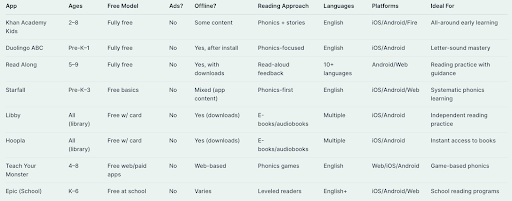
Comparison Table: What’s Free, Ads, Offline, Ages, Platforms
How to Choose the Right Free App (Age-by-Age)
Pre-readers (2–4)
At this stage, focus on apps that build letter awareness, introduce sound-letter connections, and include simple stories with pictures. Khan Academy Kids offers a gentle introduction to literacy concepts through play. Starfall’s ABC section helps children recognize letters and hear their sounds in an engaging way.
Early readers (5–7)
As children begin connecting sounds to make words, apps with structured phonics are most helpful. Duolingo ABC guides kids through blending sounds into words step by step. Google Read Along provides the support of hearing stories read aloud while encouraging kids to try reading themselves. Starfall’s learn-to-read sections build skills progressively.
Fluency & sustained reading (7–12)
Once basic decoding skills are in place, children need plenty of reading practice with interesting books at their level. Libby and Hoopla offer thousands of options through your library. If your child has access to Epic at school, encourage them to use their school account during classroom time.
Specialized needs
For bilingual families or ESL learners, Google Read Along’s multiple language options provide valuable support. Children with dyslexia may benefit from Libby’s OpenDyslexic font option, which can make text more readable for some students.
Safety, Privacy & Ads—Plain-English Notes
Most parents want reading time to be free from commercial interruptions and data collection concerns. Here’s what you should know:
Khan Academy Kids, Duolingo ABC, and Starfall’s free version all promise no advertisements, even for free users. Google Read Along processes voice recognition directly on your device, not in the cloud, and doesn’t require signing in with personal information.
Be wary of apps advertising as “free” that are actually free trials or have very limited free content. Epic, while excellent, only offers free access through educator accounts during school hours.
Library apps like Libby and Hoopla follow your public library’s privacy policies. Both offer kid-friendly filters to keep content age-appropriate.
Set Kids Up for Success: Device Setup & Parental Controls
Creating an environment where kids can focus on reading takes a little preparation:
First, if your device supports multiple user profiles, create a dedicated kids’ profile where you can control which apps appear. Hide games and other distracting apps during reading time.
For apps that support it, download content for offline reading beforehand. This works well with Libby, Hoopla, and Google Read Along, ensuring no interruptions from poor internet connections.
Parental control tools can help maintain focus during reading sessions. MMGuardian’s parental control app gives parents the ability to set specific screen time limits, approve or block app installations, and prevent game notifications from interrupting reading time. Parents control their child’s device through a companion app on their own phone.
For families wanting a more comprehensive solution, MMGuardian also offers specialized Kids Phones (built on Samsung models) with built-in safety features. These phones prevent common workarounds like safe mode or factory resets, while providing centralized controls for web filtering, app management, and contact blocking. You can use these phones with any carrier by bringing your own service plan.
Regardless of which tools you use, try to establish a consistent reading routine—maybe 15 minutes after school or before bedtime—and use Do Not Disturb mode during this time to block notifications.
Quick Start Plans (by scenario)
“No Wi-Fi at home” Download Google Read Along stories when you have connection, then use offline. With Libby or Hoopla, check out and download books while at school or a public hotspot for reading at home.
“I want no ads, period” Khan Academy Kids, Duolingo ABC, and Starfall’s basic content are all completely ad-free. These apps won’t surprise you with unexpected commercials.
“We need phonics practice” Duolingo ABC offers structured phonics lessons for beginners. Starfall provides a systematic approach to sounds and blending. Teach Your Monster to Read is free on computers and turns phonics into an adventure.
“We want tons of actual books” Combine Libby and Hoopla with your library card for thousands of options. If your child has school access to Epic, take advantage of reading time during school hours.
FAQs
What’s the best free reading app for a 5-year-old? Duolingo ABC works well for phonics fundamentals, while Google Read Along provides guided oral reading practice. Both are completely free and ad-free.
Is Google Read Along safe? Yes—it processes voice data directly on your device, not in the cloud. It can be used offline after downloading stories, and doesn’t require signing in with personal information.
Is Teach Your Monster to Read free? It’s free when used on computers through a web browser. The mobile apps for phones and tablets typically require payment, though they occasionally offer free promotions.
Is Epic free at home? No, families need a paid subscription for home use. Epic is only free for students using educator-created accounts during school hours.
Are there free e-books without subscriptions? Yes—both Libby and Hoopla provide free e-books with just a library card. No subscription needed, and both apps include kid-friendly browsing options.
How do I stop games from interrupting reading time? Use parental controls to manage distractions. MMGuardian allows you to block specific apps during set time windows and limit overall screen time, keeping reading sessions focused.
